Join the correct creator community
Open Not A Stand Game on Roblox. GamesRadar+ reports that membership is required before codes can be redeemed. Join through Roblox, then launch or rejoin Morioh High so the game can see your membership. This is a Roblox community step; a Discord account is a separate thing.
Open the game, then the menu
Use the exact Morioh High experience, credited to Not A Stand Game. Finish any character setup that blocks access to the game interface. On PC, published guides describe pressing M or using the Menu button on the left. The button is the useful route if a keyboard shortcut is unavailable.
Go to Settings → Codes
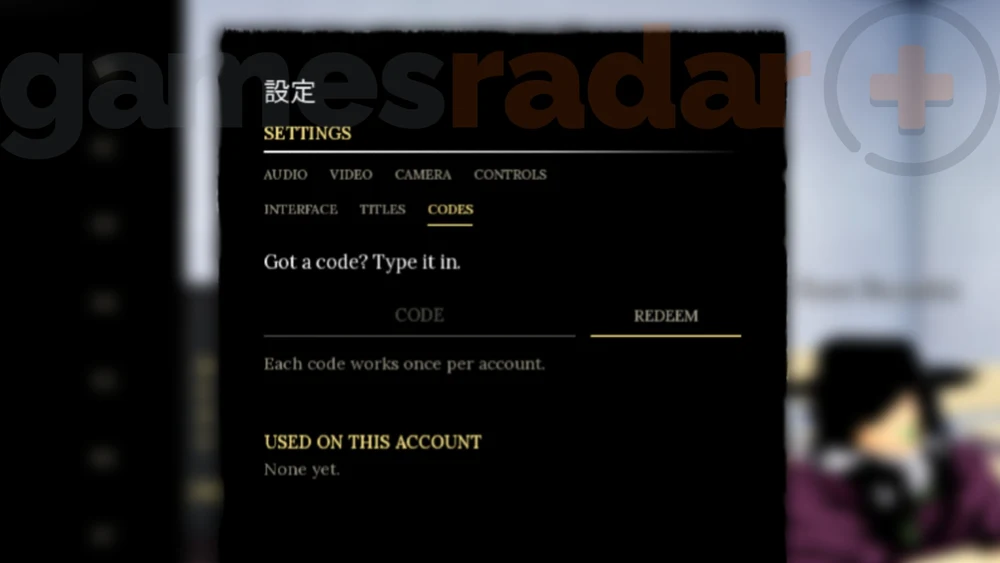
Pro Game Guides documents the menu path as Menu, then Settings, then Codes. Open the text field and paste one complete code. Keep its capital letters and remove spaces at either end. These are menu directions from published guides, not a claim that we captured today’s interface in-game.
Redeem one code and read the result
Press the in-game Redeem button once. Let the game respond before submitting anything else. A successful message or an updated reward balance is stronger evidence than seeing a code on any website. If the game rejects it, keep the exact message and use the troubleshooting guide.
Mark your own progress
Return to the code list and tick “Redeemed on this device” only after the game confirms success. Your ticks help you avoid repeating a code. They are local notes, and do not connect to your Roblox account or change the rewards you receive.
If the menus have changed
An update may move the controls. Start from the current game’s own menu or announcement rather than looking for an unrelated promo-code page on Roblox. Do not give a third-party site your Roblox password or install a code tool to complete this process.